From detection to classification: a completely new experience to interpret CNVs and SVs, bringing the best of what makes SeqOne powerful on small variants to the world of structural variants.
Table of Contents
1. A Complete Interpretation Experience
2. Account-Wide Frequency & Occurrences
3. DiagAI Score for Large Variants: UP2-SV
4. CNV & SV Precision Interpretation
5. SeqOne Browser: Purpose-Built for Large Variants
6. IGV Upgrades
7. Interactive ACMG CNV Scoring
A Complete Interpretation Experience
📌 Summary: The Large Variant Viewer is now a full-featured interpretation environment on par with the small variant viewer. DiagAI sorting, filter presets, column management, bulk actions: all the tools that make SeqOne efficient for SNVs are now available for structural variant analysis.
📊 Advanced Table Management & Navigation
- Column Manager is here:
You can now fully customize your Viewer table layout, just like in the small variant viewer. Use our new SeqOne column presets to instantly focus on the most relevant columns for Germline or CGH analyses. - Bulk Actions & Progress Tracking:
We’ve added the ability to select rows, allowing you to perform bulk actions on multiple variants at once. Use the “Mark as Viewed” feature to clearly track your interpretation progress. - Reorganized Filtering:
We’ve updated the "Type" menu with categories so you can isolate specific variant types faster. - Quick Access Bar:
You can now save your favorite filter profiles and access them with a single click, allowing for much faster navigation through large variant sets. - Embedded IGV Access:
For WES analyses, you can now temporarily access the familiar IGV browser from our legacy Viewer directly within the "IGV" section of the variant drawer, while we work on our next-generation visualization tools.
🌟 Other improvements
Restricted Panels for CNVs & SVs:
Your panel restrictions are now automatically applied to the Large Variant Viewer, ensuring your view remains focused on the genes selected for your analysis.
Account-Wide Frequency for CNV & SV
- Entity-Level SampleFreq:

A new column shows how often an event appears across your entire account (split by Germline, Somatic, or aCGH), helping you instantly distinguish common artifacts from rare findings. - Matching filter and sorting option are available: use the slider filter to focus on rare events, or sort the table by account frequency.
- Detailed Occurrences:
The "Occurrences" tab in the details drawer now includes an Entity tab, listing all projects where the event has appeared. Simply click on a project to get the sample-level context. - One-Click Refresh:
A new refresh button updates both Project and Entity-level frequencies simultaneously. Note: For analyses processed before this update, you must hit this button to populate entity values.
DiagAI Score for Large Variants: UP2-SV
📌 Summary: We are releasing UP2 for Large Variants! Our UP2 pathogenicity score is now available in the Large Variant Viewer. You can find the new UP2 column within the "Scores" section for CNVs and SVs.
- Dedicated UP2-SV Pathogenicity model:
- Trained specifically for Copy-Number variants (CNVs)
- Trained on a large dataset of 70k known ClinVar variants and is based on 30 features inspired from ACMG-CNV guidelines
- Giving a pathogenicity score on a range of -1/1
- Validated on Clinvar data and internal cohorts
- DiagAI score:
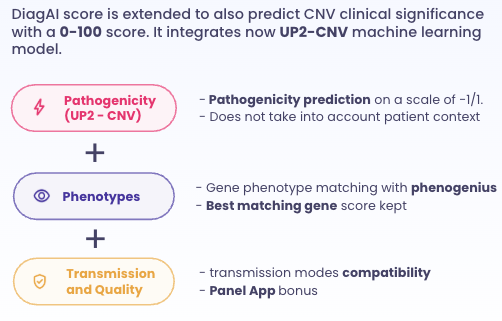
- Sorting: Sort and filter structural variants by UP2-SV score, just like you do for SNVs
- 97.6% validation recall on internal clinical-SV dataset (41/42 pathogenic variants)
CNV & SV Precision Annotation
- Enhanced Gene & Region Details: The details tab now features direct hyperlinks to ClinGen and OMIM. It also displays transcript versions, coding status, and precise % overlap indicators (including the specific location: start, middle, or end).
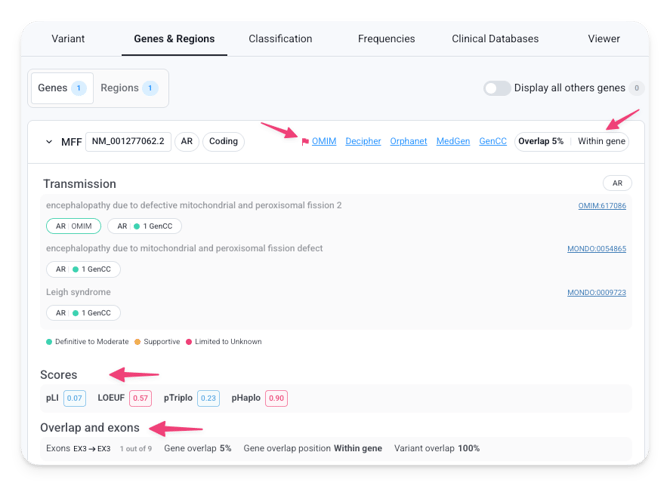
- Comprehensive ClinGen Scoring: We now evaluate both Genes and Regions in ClinGen, displaying the maximum score. Hover over the score in the table to see the specific source and name.
- New Ploidy Alerts (WES): A high-visibility warning now appears at the top of the table if abnormal ploidy is detected, ensuring you have the full QC context immediately.

🗺️ SeqOne Browser: Purpose-Built for Large Variants
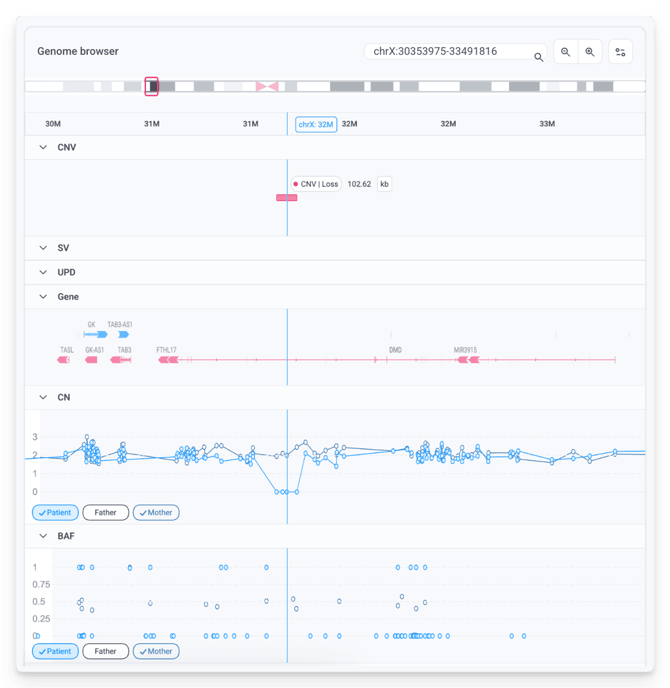
📌 Summary: the new SeqOne Browser is our first-party genome browser, designed specifically for structural variant exploration. It is currently in its first iteration, and already packed with useful tracks.
- Navigation basics: Cytoband display, coordinates field, and zoom controls.
- Event track: Visualizes the span of the selected CNV, SV, or UPD event
- Genes track (RefSeq): Gene symbols, transcripts, and exons
- Copy Number track: Equivalent to the DCN track in IGV
- BAF plot: Directly integrated for allelic frequency visualization, replacing the “CNV Browser” button of the CNV viewer.
- Database track: DGV is available in this first version, with GnomAD, ClinVar, and Decipher tracks coming in future releases. Clicking on the track opens a modal displaying all overlapping events at that location, with color intensity reflecting event density.
💡 Quick tip: scrolling while your cursor is over the browser will zoom in and out rather than scroll the page — move your mouse to the side to scroll normally. We're working on it!
IGV Upgrades
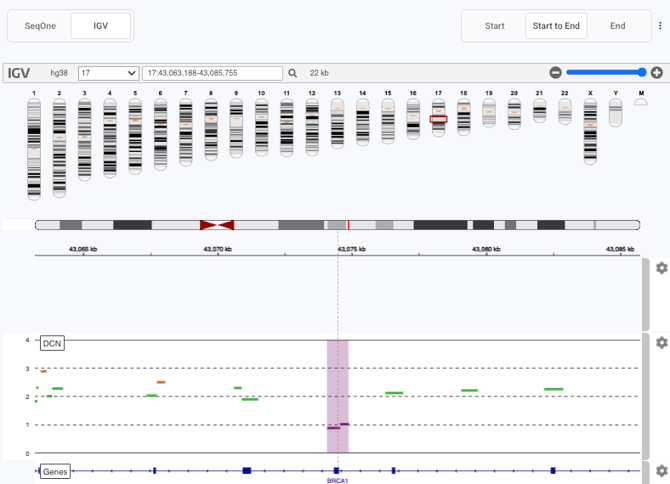
📌 Summary: the embedded IGV Browser has been upgraded for CNVs & SVs to bring you more tracks, flexibility and context.
The IGV Browser has also received meaningful upgrades:
- BAM tracks with nucleotide display have been added for read-level visualization.
- The DCN track is still available, and the ability to display tracks from other samples has been restored and improved — in family analyses, you can now visualize tracks for other family members side by side.
- New breakpoint navigation buttons let you jump between the start, end, and full span of an event — particularly useful for SVs, where soft-clipped reads are now displayed by default. Navigation buttons are automatically disabled for insertions where start and end coordinates are identical. The "Open in local IGV" button respects your current navigation choice.
Finally, a small but handy addition to the Large Variant table: the "Location" column now offers a quick-copy button for coordinates, with 1Kbp padding included!
🚥 Interactive ACMG CNV Scoring
📌 Summary: We have brought a new visualization of ACMG-based CNV classification directly into the Large Variant Viewer, for CNV Gain and Loss variants.
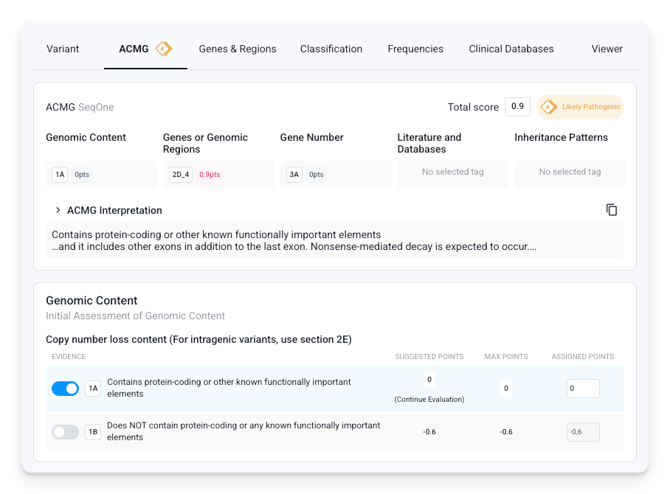
A new "ACMG" tab in the variant details drawer organizes all relevant criteria by category — Genomic Content, Genes & Regions, Gene Number, Literature & Databases, and Inheritance Patterns — and displays a live classification summary with automatic scoring, from Pathogenic to Benign. The Loss or Gain context is automatically inferred from the variant type.
The interface is fully interactive: criteria pre-selected by the bioinformatics pipeline are displayed and can be toggled on or off, numeric ranges adjusted, and evidence levels fine-tuned — with the overall score updating in real time so you can immediately see the impact of each change.
💡 This experience mirrors what you already know from the Small Variant Viewer: note that changes made here are not saved, and the underlying classification logic remains based on ClinGen guidelines, unchanged.
Finally, you can copy the full ACMG interpretation text with one click for seamless integration into your evaluation or into your reports.
Additional improvements
- 📄 Expanded Variant Page: The Large Variant Viewer now includes a button to open the full variant details page, mirroring a feature already available in the Small Variant Viewer.
- 🔢 Ploidy Display in WGS: A new "Ploidy" button in the CNVs & SVs viewer lets you visualize the detected ploidy chromosome by chromosome — useful for quickly spotting aneuploidies or sample quality issues. This is also available in the legacy CNV viewer.
- ⌨️ New Keyboard Shortcut: Press F to open or close the filter drawer in the Large Variant Viewer, in line with the shortcuts already available in the Variant Viewer.
- 📊 BAF Plot for GermVar WES: A BAF plot is now available for GermVar WES analyses, both in the new SeqOne browser and in the legacy viewer via a dedicated button.