The New Two-Layer Filter System
Following the Spring 2026 Release, the Variant Knowledge Base (VKB) has moved to a dual-layer architecture. To support this, the filter panel now features two distinct "Classification" menus.
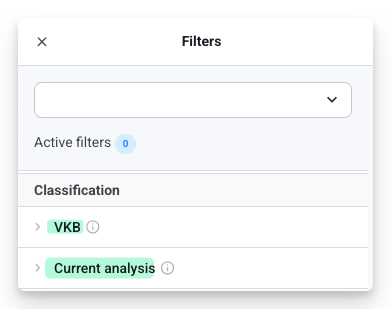
- "VKB" Filter: Use this to filter based on Consolidated Account-level annotations (findings shared across your entire organization).
- "Current Analysis" Filter: Use this to focus on the Case-level evaluations made specifically for the sample you are currently reviewing (including variants already added to your "Selection").
💡 Tip: You can combine both filters to find variants that have a specific global history and a specific status in your current case.
Filter Logic
The power of the V2 filters lies in how they handle multiple criteria. The system uses a specific combination of OR and AND logic.
1. Internal Logic: The "OR" Rule
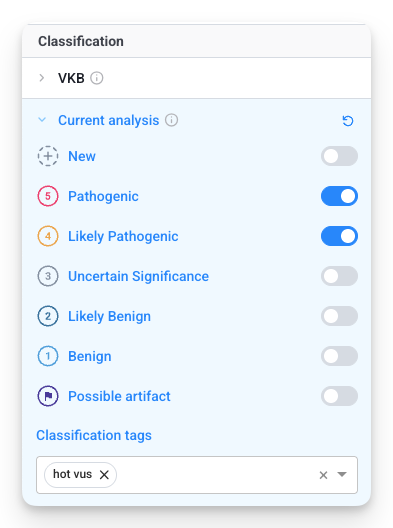
Within a single filter menu, the logic is OR. If you select multiple classifications or tags within one menu, the system will show variants that match any of those criteria.
Example: Selecting "Pathogenic," "Likely Pathogenic," and the "Hot VUS" tag in one menu will return variants that are Pathogenic OR Likely Pathogenic OR tagged as a "Hot VUS."
2. Between-Filter Logic: The "AND" Rule
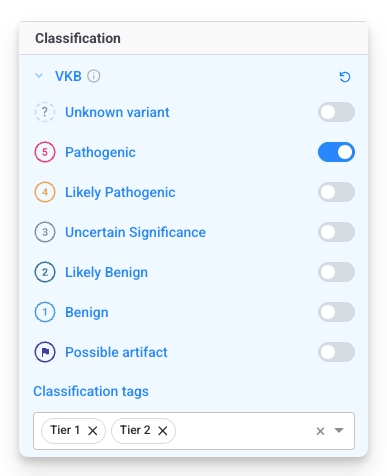
When you use both the VKB and the Current Analysis filters together, the logic between them is AND. The variant must meet the requirements of both sets to appear in your results.
- Filter A (VKB, figure on the left): Global status is Pathogenic OR Likely Pathogenic, OR Tag is "Tier 1", OR Tag is "Tier 2".
- Filter B (Current Analysis, figure above): Sample status is Pathogenic OR Likely Pathogenic OR includes the "Hot VUS" tag.
The Result: You will only see variants where Filter A AND Filter B are true: P+LP+hot vus variants reported in your analysis AND classified as P or LP or Tier 1 or Tier 2 in your VKB.